
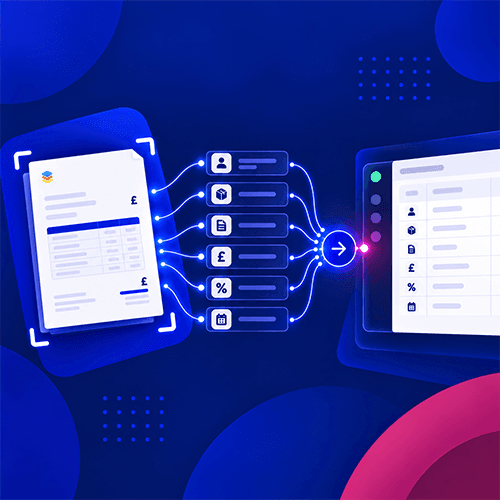
You approve an invoice in your AP system. Then someone in finance enters the same supplier, amount and codes into the accounting software.
That second step raises a fair question: what should the AP system send to your accounts, and what information should come back?
The answer depends on your accounting package, but the aim is straightforward. Finance should receive an accurate, approved bill without re-entering it, while the people managing approvals can still see what happened to it.
The short answer
An AP integration should send finance the information needed to post an approved invoice accurately. It should also keep the invoice, purchase order and payment status easy to trace. The exact fields and direction of sync depend on your accounting package.
| AP data | Why it matters | Question to ask |
|---|---|---|
| Suppliers | Ensures the bill posts to the correct supplier account | Which system creates and updates supplier records? |
| Invoice details | Records the liability and when it is due | Do invoice numbers, dates, amounts, tax, currency and line items transfer? |
| Financial coding | Keeps management reports accurate | Do nominal codes, departments, projects and jobs map at line level? |
| Original invoice | Lets finance verify the accounting entry | Is the PDF attached to the bill or linked back to AP? |
| Purchase orders | Connects the invoice to approved spend | Does the integration transfer a PO reference or the full order? |
| Approval and payment status | Makes the invoice’s progress traceable | Where is approval history held, and can paid status sync back? |
Before setting up a sync, decide which system owns each type of data. A connection can move information quickly, but it cannot resolve two conflicting supplier records or an incorrect project code for you.
1. Supplier and coding data
The invoice needs to reach the right supplier account. Your AP system also needs valid nominal accounts, tax codes and any departments, projects or jobs used to code spend.
In many setups, that information starts in the accounting system and is made available in AP. The important decision is who can create or change it. If a supplier is renamed or a code is retired, how will the AP team know?
Ask the same question about supplier bank details. A change to payment information should follow your verification process, rather than pass between systems without review.
2. The approved invoice
Once an invoice has been checked and approved, the accounting system needs enough detail to record it correctly. Check whether your integration transfers:
-
the supplier and invoice number;
-
invoice and due dates;
-
net, tax and gross amounts;
-
currency, where relevant;
-
invoice lines and their descriptions; and
-
the coding applied to each line.
Line-level detail matters if you split a bill between projects, departments or tax codes. If the integration sends only the total, finance may still have to open the PDF and correct the posting manually.
Agree when the export happens, too. Should an invoice go across as soon as it is captured, after approval, or only when finance releases it? For most controlled AP processes, approval is a useful hand-off point.
3. The invoice PDF and a clear reference
A posted bill is much easier to check when finance can open the original supplier invoice from the accounting entry. Some integrations attach the PDF; others keep the document in the AP system and provide a way to find it.
Either approach can work. What matters is that the person reviewing a cost can get from the accounting entry to the document and its approval history without a lengthy search.
Use the supplier and invoice number consistently across systems. That also makes duplicate checks and investigations easier.
4. Purchase order information
A purchase order gives context to an invoice: what was approved, for how much and by whom. But “PO sync” can mean two different things.
Your accounting system may only need the PO number on the approved bill. Alternatively, your organisation may need a full purchase order record in its ERP to track commitments.
Ask which option the integration supports for your accounting package. Then test a partial invoice against a PO and an invoice covering more than one order. These are the cases most likely to reveal a missing link.
5. Approval history and payment status
The full approval trail does not necessarily need to be copied into the accounting ledger. It does need to remain available: who approved the invoice, when they did it and how any exception was resolved.
Payment status may need to move back towards AP. If finance pays a bill in the accounting system, can the AP team see that it has been settled? If payment runs are prepared elsewhere, which system confirms that payment actually happened?
Decide which system is authoritative for paid status. Otherwise, one screen can show an invoice as ready to pay while another shows it as settled.
Test the awkward invoices before you commit
A standard one-line invoice is a useful starting point, but it will not tell you enough about an integration. Ask to see what happens with:
-
an invoice split across two projects or departments;
-
a credit note;
-
an invoice matched to a purchase order;
-
a partial invoice against a larger order; and
-
an export that fails because a supplier or code is missing.
Check the resulting entry in your accounting software, including the tax, coding, PDF and references. Also ask how the system reports an error and prevents a retry from creating a duplicate bill.
Where does Zahara fit?
Zahara manages the work before the accounting entry: purchase orders, invoice capture, matching and approvals. Approved invoice data can then move into your finance system through the appropriate Zahara integration.
The exact records and fields depend on the package. For example, Zahara’s MYOB integration brings in suppliers, accounts, jobs and tax codes, then sends approved invoices and purchase orders to MYOB. You should check the mapping for your accounting system rather than assume every integration works in the same way.
The buying test is simple: can an approved invoice arrive in the accounts with the right supplier, values, tax, coding and supporting document, without finance doing the work twice?
If you would like to map that hand-off for your current software, talk to one of the sales team.