
Is your finance team playing procurement ping-pong with emails and spreadsheets? Then it's time to talk about Purchase Order Management (POM) — the process that brings order to your orders.
POM helps businesses control costs, keep approvals watertight, and avoid that awkward "Who approved this?" moment.
So, What Is Purchase Order Management?
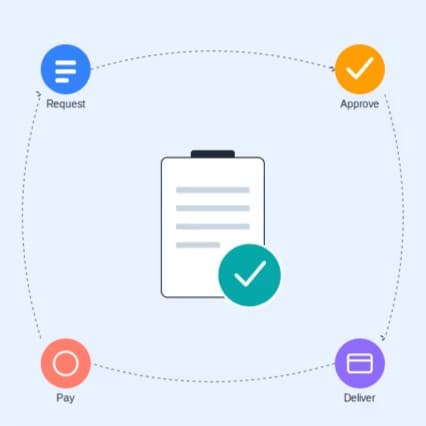
Purchase Order Management means tracking and controlling purchase orders from request to delivery. It's how you stop rogue spending and make sure everything is approved, documented, and visible — before the money goes flying out the door.
Here's what it covers:
- Approval workflows
- Sign-off limits
- Supplier selection
- Audit trails
- Return on investment (yes, it really does save you money)
Purchase Approval Workflows
This is the heartbeat of POM. A purchase request moves through predefined steps — from "Can we buy this?" to "Yes, here's the PO."
Each step has a decision-maker. Could be your team lead, finance officer, or the person with the company credit card (hopefully not all three).
Workflows:
- Keep approvals structured
- Prevent rogue spending
- Build accountability
- Speed things up when deadlines are tight
Sign-off Limits (a.k.a. Who Can Say Yes?)
Every business needs rules. And in purchasing, that means spending limits.
You decide who can approve what based on the amount. For example:
No more "Oops, I ordered a second espresso machine."
What Happens Without Purchase Order Management: The Risk of Doing Nothing
Skip structured POM and you're not just risking a messy spreadsheet — you're opening the door to problems that get expensive fast.
Fraud. No PO, no paper trail. When purchases can be made and invoiced without ever being checked against an approved order, it becomes far easier for duplicate invoices, inflated pricing, or entirely fictitious suppliers to slip through unnoticed. Segregation of duties — the requester isn't the approver isn't the payer — is one of the most basic fraud controls in finance, and it only works if every purchase actually runs through a workflow.
Human error. Manual processes mean manual mistakes: the wrong quantity typed into an email, an order placed twice because nobody could see it had already gone out, an invoice paid against the wrong PO number. None of these are dramatic on their own. Stacked up across a year of purchasing, they quietly erode margin.
Maverick spend. Without sign-off limits, anyone with a supplier relationship (or a company card) can commit the business to costs nobody signed off on. It's rarely malicious — usually just someone trying to keep a project moving — but it makes budgets meaningless and forecasting close to impossible.
No audit trail. When a supplier query, an auditor, or a trustee asks "who approved this and why," you need an answer with a timestamp on it. Email threads and verbal agreements don't hold up nearly as well as a logged, approved PO.
The pattern across all four is the same: risk grows in the gap between "we decided to buy this" and "there's a record of who decided and why." Structured PO management closes that gap.
Picking the Right Suppliers
You want suppliers who deliver on time, don't ghost you after the invoice, and ideally, know what EDI means.
Zahara helps you manage:
- Supplier profiles
- Contract details
- Performance history
- Payment terms
And if a supplier drops the ball? You'll have the data to show it — and move on.
From Spreadsheets to Structure: Making the Switch Without the Chaos
Most businesses don't start with formal PO management — they grow into needing it. If you're currently running purchasing through email chains, verbal "just order it" approvals, and a spreadsheet someone updates when they remember to, here's how to move to something structured without bringing the business to a halt.
1. Map what's actually happening now. Before you fix the process, write down the real one — not the one in the handbook. Who currently requests purchases? Who actually approves them (versus who's supposed to)? Where do things get stuck? You can't design sensible workflows around a process you haven't honestly looked at.
2. Start with sign-off limits, not the whole system. Trying to formalise everything on day one is how transitions stall. Agree spending thresholds and who owns each one first — it's the single change that stops the most risk, and it's simple enough to roll out in a week.
3. Bring in the people who'll actually use it early. The office manager who's been raising POs off the side of her desk, the site manager ordering materials from his van — their buy-in decides whether the new process sticks or gets quietly bypassed. Ask what's currently painful about purchasing before you hand them a new tool.
4. Digitise the approval chain before anything else. Even before full automation, moving approvals out of email and into a system with a timestamp and an audit trail closes most of the risk gap described above.
5. Run both processes in parallel, briefly. A hard cutover invites errors. Give people a couple of weeks where the old and new methods coexist, with a clear date when the old one stops being accepted.
6. Review after 90 days, not before. Give the new process long enough to bed in before you start tweaking it — most "this isn't working" feedback in the first month is really "this is unfamiliar."
The businesses that make this transition smoothly tend to treat it as a change management project, not just a software rollout.
Real Results: How Businesses Improved Their PO Process
It's one thing to talk about structured purchasing in theory — here's what it's looked like in practice for two very different organisations.
CC Ground Investigations, a UK-wide geotechnical and drilling contractor, needed every invoice tied to a specific purchase order and approved by the right department before payment — previously, that link wasn't guaranteed. After implementing Zahara, their accounts administrator described the peace of mind that comes from knowing invoices can't slip through without the matching approval, alongside a smoother, more transparent AP workflow overall.
Right at Home, a national care provider, had outgrown a standalone form that gave nobody visibility over where an approval actually sat, didn't check budgets, and didn't integrate with their finance system. Their Group Financial Controller wanted a system that mirrored their management structure and told people when something needed attention, rather than requiring constant checking. After moving to Zahara, approvals could be handled by budget holders directly rather than escalating everything to directors, staff could see where a PO sat without chasing finance, and automated reminders kept approvals from stalling — cutting the admin load on the finance team significantly.
The common thread: neither business needed a bigger team to fix their purchasing problems — they needed visibility and structure
The Real ROI (Spoiler: It's Not Just About Saving Money)
Good PO management doesn't just protect the bank balance. It also:
- Speeds up procurement
- Reduces manual errors
- Improves negotiation with suppliers
- Gives finance teams visibility into spend
- Helps with forecasting and budget planning
In Zahara, everything's automated — so your AP team won't need to chase paper trails or decode spreadsheets from 2006.
How Technology Is Changing Purchase Order Management
PO management used to mean paper forms, filing cabinets, and someone's memory of "didn't we already order this?" That's changed fast, and it's worth knowing what's actually driving the improvement in efficiency and accuracy.
Cloud-based systems replaced the single-spreadsheet-on-one-computer model with something anyone approved can access from anywhere — office, site, or the school run. That alone removes most of the "I'm not at my desk" approval bottleneck.
AI and OCR now read invoices and cross-check them against purchase orders and goods-received notes automatically, catching mismatches and potential duplicate or fraudulent invoices that a tired pair of human eyes might miss late on a Friday.
Automated matching (three-way matching between PO, delivery, and invoice) does in seconds what used to take an AP clerk several manual checks per invoice — and it does it consistently, every single time, regardless of workload.
Mobile approvals mean a purchase doesn't sit waiting for a director to get back to their desk. Sign-off happens from a phone, with the same audit trail as it would from a laptop.
Integrations with accounting platforms (Xero, QuickBooks, Sage, and others) mean approved POs and matched invoices flow straight into the finance system, instead of being re-keyed by hand — which is itself one of the more common sources of the human error covered earlier in this article.
The net effect of all of this isn't just speed. It's that accuracy stops depending on how careful or how busy any one person is on a given day.
Features You'll Actually Use (And Like)
| Feature | What It Actually Does |
|---|---|
| Approval Workflows | Multi-step, conditional routing — different managers sign off based on value, budget, or entity. No more guessing who's next in line. |
| Purchase Orders | Raised in seconds from web or mobile, then auto-sent to suppliers once approved. No more "did that email even send?" |
| Budgets | Set against departments, projects, GL codes, or cost centres — with real-time balance visibility before anyone commits spend. |
| Supplier Management | Profiles, contract details, payment terms, and performance history in one place — no more digging through inboxes. |
| AI Invoice Processing | OCR reads invoices, matches them to POs and GRNs, and flags mismatches — before they turn into duplicate payments. |
| Mobile Approvals | Approve, reject, or query from a phone. Purchases don't stall just because someone's out of the office. |
| Reporting & Analytics | Drill into spend by line item, department, or supplier — connect to Power BI or Excel if you want to go deeper. |
| Finance Integrations | Syncs with Xero, QuickBooks, Sage, and more — approved data flows straight through, no re-keying. |
| Full Audit Trail | Every request, approval, and edit logged — so "who approved this?" always has a timestamp attached. |
Who Actually Needs PO Management?
We've found it's best for service-based organisations that buy a lot — not stock-based companies with a massive ERP.
Perfect fit:
- Construction – materials, plant hire, subcontractors
- Care Homes – consumables, medical gear
- Events & Festivals – short bursts of buying with tight budgets
- Charities – strong audit trail for trustee scrutiny
- Sports Teams – kit, catering, logistics
- Energy Firms – assets, spare parts, maintenance services
Final Thoughts
Purchase Order Management isn't for everyone. But if your business is growing, and you've ever faced:
- A duplicated order
- A mystery supplier
- A budget black hole
…then it's definitely for you.
If you have 20+ employees and your buying process feels like the Wild West, Zahara's PO system can help you take control before it gets messy.