

If you’re searching for the best purchase order software, you want three things: clear controls, quick approvals, and zero surprises at month‑end. Zahara delivers all three—without the bloat. This guide keeps it light, shows how Zahara stacks up against Tipalti, Compleat Software and Yooz, and gives you a clean diagram of the purchase order cycle.
What “best” means for purchase orders
- Raise requests fast with guardrails.
- Approvals that match your rules.
- 3‑way matching so invoices match the PO and the goods received.
- Budget checks before anyone buys.
- Works with your finance system (Sage, Xero, Business Central, and more).
- Simple to roll out. Clear pricing.
Explore Zahara’s purchase order software and full features.
Zahara in 60 seconds
- Raise purchase requests and purchase orders with line‑level coding.
- Multi‑step approvals by value, project, department, or supplier.
- Goods receipting (GRN) with full audit trail.
- 3‑way match of PO, GRN, and invoice to stop errors before they hit your ledger.
- Works with Sage, Xero, Microsoft Dynamics 365 Business Central, Intacct, MYOB, and others.
- Scan, route, and approve invoices with invoice approval software and invoice processing.
- Push approved bills to your finance system for payment runs, or schedule supplier runs with scheduled supplier payments.
- Clear, fair pricing.
For detail on GRN and matching in Zahara, see our quick start and help content (GRN steps and 3‑way match). Zahara AP Automation+2Zahara AP Automation+2
Zahara vs Tipalti, Compleat, and Yooz
Here’s a simple, buyer‑friendly view. The last column links to each vendor’s own page for reference.
[table id=41 /]
Why these calls?
- Tipalti markets end‑to‑end PO management with 3‑way matching and a clear focus on cross‑border payouts and tax workflows.
- Compleat positions P2P across PO creation, goods receipting, and AP with 2‑ and 3‑way matching.
- Yooz documents purchase requisitions, order sending, goods reception, and PO‑invoice matching; it also explains exporting invoices to ERP for payment.
Why Zahara is the best purchase order software for growing teams
- Stop surprise invoices. PO first, approvals up‑front, and a rock‑solid 3‑way match. Zahara AP 3-Way Matching
- Keep buyers inside the rules. Budgets, caps, and project codes guide each request.
- Zero guesswork at month‑end. GRN status and invoice matching give you a clean trail.
- Works with your stack. Zahara connects to Sage, Xero, Business Central, and more.
- Fast to roll out. Clear menus, clean workflows, and a friendly UI your site team can use without a manual.
Want a deeper dive into Accounts Payable automation software?
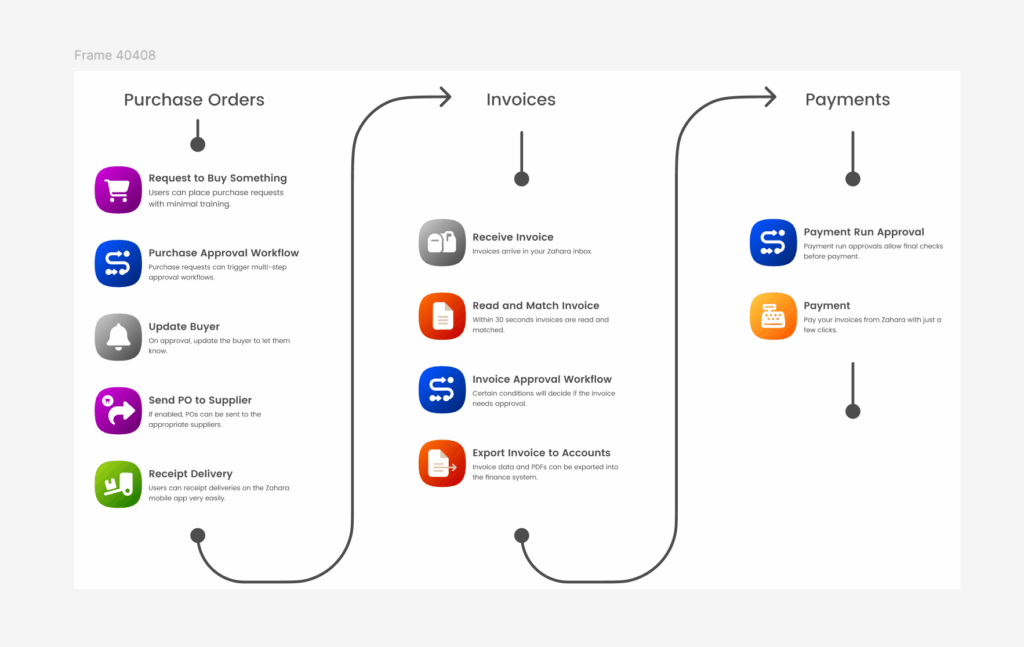
PO cycle Zahara supports from request to payment.
1) Raise requisition
   ↓
2) Budget check & approval
   ↓
3) Create Purchase Order (PO)
   ↓
4) Send PO to supplier
   ↓
5) Delivery / service
   ↓
6) Goods receipting (GRN)
   ↓
7) Supplier invoice received
   ↓
8) 3-way match (PO + GRN + Invoice)
   ↓
9) Invoice approval
   ↓
10) Post to finance system & pay
If you’re new to GRNs or 3‑way match, we’ve covered both in detail on the Zahara blog and help centre:
How to pick the right PO system (quick checklist)
- Can non‑finance staff raise requests without training?
- Can you create approval rules by amount, project, cost code, and supplier?
- Is 3‑way match automatic once goods are receipted?
- Can you check budgets before approval?
- Does it work with your finance app with minimal set‑up?
- Is pricing simple and public?
Try this in Zahara: raise a request, approve it, send the PO, GRN the delivery, and watch the invoice match itself. Then push the approved bill to your finance system and run a batch. Job done.
The best Purchase Order Software FAQs
It’s a tool to control spend before you buy. Staff raise requests, managers approve, a PO goes to the supplier, and goods are receipted. Invoices then match the PO and GRN automatically.
No. Zahara manages requests, POs, receipts, and approvals, then pushes the approved bill to your finance system (Sage, Xero, Business Central, and more). You keep your ledger and reporting.
Yes. Zahara matches PO + GRN + invoice to stop errors before payment. Zahara AP Automation
Most teams get the basics running quickly: submit a request, approve it, send a PO, receipt goods, and match the invoice—all in one session. No long projects required.
Zahara focuses on tight PO control and a clean AP flow. Tipalti adds global payouts and tax handling. Compleat offers broad P2P. Yooz leans into AP capture and PO matching with payment handled in your ERP.
Next steps
- See purchase order software in action.
- Review Zahara’s features.
- Check pricing.
- Explore more on AP automation and invoice processing.